Claude Code (Opus 5.5) और Remotion से Reels में मोशन ग्राफिक्स कैसे डालें
Pawan Joshee··7 min read
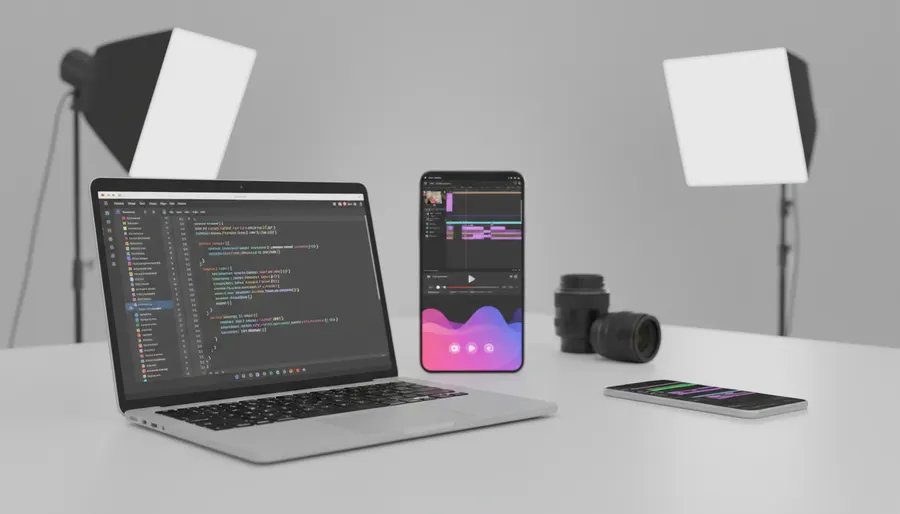
अगर आप अपनी Instagram Reels में कमाल के, कस्टमाइज्ड मोशन ग्राफिक्स जैसे कि lower-thirds, kinetic text, zoom punch-ins, और progress bars डालना चाहते हैं, तो Remotion और Anthropic का Claude Code एक बहुत ही शानदार और मॉडर्न तरीका है. इसके लिए आपको भारी-भरकम वीडियो एडिटिंग सॉफ्टवेयर की जरूरत नहीं पड़ती। आप सीधे React कोड लिखकर अपनी वीडियोज़ के लिए ट्रांसपेरेंट (पारदर्शी) ओवरले फाइल्स रेंडर कर सकते हैं, और फिर उन्हें CapCut या Premiere Pro जैसे वीडियो एडिटर्स में अपनी Reels के ऊपर आसानी से लगा सकते हैं.
इस ट्यूटोरियल में हम आपको शुरू से लेकर अंत तक पूरी प्रोसेस सिखाएंगे। हम देखेंगे कि Node.js कैसे इंस्टॉल करना है, एक नया Remotion प्रोजेक्ट कैसे सेटअप करना है, और Claude Code (जो कि Anthropic के सबसे एडवांस Claude Opus 5.5 मॉडल पर काम करता है) की मदद से सिर्फ आसान अंग्रेजी प्रॉम्प्ट्स देकर कमाल के मोशन ग्राफिक्स कैसे डिजाइन करने हैं. इस गाइड के खत्म होने तक आपके पास अपनी शॉर्ट-फॉर्म वीडियोज़ के लिए प्रोफेशनल ओवरले बनाने का एक बहुत ही आसान और ऑटोमेटेड तरीका होगा।
Reels के लिए Remotion और Claude Code क्यों इस्तेमाल करें?
Remotion एक React-आधारित फ्रेमवर्क है जो आपको कोड की मदद से वीडियो बनाने की सुविधा देता है. After Effects में मैन्युअली कीफ्रेम सेट करने के बजाय, आप रियूजेबल (reusable) React कंपोनेंट्स लिख सकते हैं। इसका मतलब है कि आप सिर्फ कुछ लाइनों के कोड से या एआई असिस्टेंट की मदद से कलर, टेक्स्ट और टाइमिंग बदल सकते हैं।
Claude Code, Anthropic का एक CLI डेवलपर एजेंट है। सितंबर 2026 में रिलीज हुआ Claude Opus 5.5 मॉडल अपनी "adaptive thinking" (अनुकूलनशील सोच) के लिए जाना जाता है, जो जटिल और मुश्किल कोडिंग काम को बहुत ही आसानी से समझ लेता है। यह आपके पूरे प्रोजेक्ट को समझ सकता है, फाइल्स एडिट कर सकता है और आपके टर्मिनल में कमांड्स भी रन कर सकता है। जब आप इसमें Remotion के ऑफिशियल Agent Skills इंस्टॉल कर लेते हैं, तो Claude Code को Remotion की कोडिंग गाइडलाइन्स की गहरी समझ मिल जाती है, जिससे यह आपके लिए बिल्कुल परफेक्ट टाइमिंग वाले एनिमेशन्स बना देता है।
Step 1: Node.js इंस्टॉल करना और Remotion प्रोजेक्ट सेटअप करना
शुरू करने के लिए, आपके कंप्यूटर पर Node.js (v18 या उससे ऊपर) इंस्टॉल होना चाहिए। इसके बाद अपना टर्मिनल (या कमांड प्रॉम्प्ट) खोलें और एक खाली Remotion प्रोजेक्ट बनाने के लिए नीचे दी गई कमांड्स रन करें:
npx create-video@latest --yes --blank my-video
cd my-video
अब, प्रोजेक्ट डायरेक्टरी के अंदर Remotion के ऑफिशियल कोडिंग स्किल्स इंस्टॉल करें ताकि Claude Code को समझ आ सके कि कोड कैसे लिखना है:
npx remotion skills add
अपने एनिमेशन्स को लाइव देखने के लिए लोकल डेवलपमेंट सर्वर को स्टार्ट करें:
npm run dev
Step 2: Claude Code को एक्टिवेट करना
अपने मोशन ग्राफिक्स को डिजाइन करना शुरू करने के लिए, एक नया टर्मिनल विंडो खोलें, अपने प्रोजेक्ट फोल्डर (my-video) में जाएं और इस कमांड को रन करके Claude Code को लॉन्च करें:
claude
यह आपके टर्मिनल में एआई कोडिंग एजेंट को शुरू कर देगा। अब आप सीधे एआई से फाइल्स लिखने, कोड एडिट करने और प्रोजेक्ट को कस्टमाइज करने के लिए कह सकते हैं।
Step 3: Claude Code के लिए 6 कॉपी-पेस्ट प्रॉम्प्ट्स
अपनी Reel के लिए अलग-अलग मोशन ग्राफिक्स बनाने के लिए आप Claude Code को ये 6 प्रॉम्प्ट्स दे सकते हैं:
Prompt 1: Project Setup
We are building vertical 9:16 motion graphics overlays for Instagram Reels. Configure the project for 1080x1920 resolution, 30 fps, and a default transparent background.
Prompt 2: Slide-in Lower Third
Create a React component inside 'src/components/LowerThird.tsx'. It should be an animated lower-third overlay for a social media handle. It needs a sliding entrance animation from the left, a sleek modern background bar with a gradient (e.g., violet to pink), a profile picture placeholder, and text for the name and handle. Use Remotion's 'spring' or 'interpolate' for a smooth transition.
Prompt 3: Kinetic Text Bounce
Create a kinetic text component in 'src/components/KineticText.tsx'. It should animate three words ("AI", "POWERED", "VIDEO") appearing one after another with a punchy bounce scale effect. Each word should stay on screen for 20 frames, with a scale-up spring animation when it enters.
Prompt 4: Viewfinder Zoom Punch-in
Create a zoom punch-in overlay component in 'src/components/ZoomOverlay.tsx'. It should display a stylish focus-bracket corner graphic (like a camera viewfinder) that quickly scales down and fades out, creating a dynamic 'punch-in' visual indicator for when the speaker makes an important point.
Prompt 5: Dynamic Progress Bar
Create a progress bar component in 'src/components/ProgressBar.tsx'. It should render a thin 8px horizontal line at the very bottom of the 1080x1920 frame. The bar should fill from left to right, reaching 100% width exactly at the last frame of the composition. Use 'useCurrentFrame' and 'useVideoConfig' to calculate the progress percentage.
Prompt 6: Registering Compositions
Update the main entry file (e.g., 'src/Root.tsx' or 'src/index.ts') to register all four compositions: LowerThird, KineticText, ZoomOverlay, and ProgressBar. Ensure each composition has a width of 1080, height of 1920, and transparent background enabled.
Step 4: Remotion कोड के बेसिक कॉन्सेप्ट को समझना
भले ही सारा कोडिंग का काम Claude Code खुद संभाल लेता है, लेकिन Remotion के बेसिक स्ट्रक्चर को समझना हमेशा फायदेमंद रहता है। यहाँ एक बहुत ही सिंपल रिएक्ट कंपोनेंट का उदाहरण दिया गया है, जो Remotion के फिजिक्स इंजन का इस्तेमाल करके टेक्स्ट को स्मूथली स्केल-इन (बड़ा) करता है:
import { AbsoluteFill, spring, useCurrentFrame, useVideoConfig } from 'remotion';

export const SimpleOverlay = () => {
  const frame = useCurrentFrame();
  const { fps } = useVideoConfig();

  // 'spring' की मदद से लिनियर ट्रांजिशन के बजाय एक नेचुरल और बाउन्सी मूवमेंट मिलता है
  const scale = spring({ frame, fps, config: { damping: 12 } });

  return (
    <AbsoluteFill style={{ justifyContent: 'center', alignItems: 'center' }}>
      <div style={{ transform: `scale(${scale})`, color: 'white', fontSize: 80, fontWeight: 'bold' }}>
        BOOM!
      </div>
    </AbsoluteFill>
  );
};
Step 5: ट्रांसपेरेंसी (पारदर्शिता) के साथ वीडियो रेंडर करना
इन मोशन ग्राफिक्स को अपनी असली वीडियो के ऊपर सेट करने के लिए, आपको इन्हें ट्रांसपेरेंट बैकग्राउंड (alpha channel) के साथ रेंडर करना होगा। नीचे दी गई टेबल में रेंडरिंग के अलग-अलग ऑप्शन्स की तुलना की गई है:
| Format | Codec | Alpha Channel | Compatibility | Best Use Case |
|---|---|---|---|---|
| WebM | VP8 / VP9 | हाँ | Chrome, Firefox, VN Editor (Desktop) | लाइटवेट वेब ओवरले के लिए |
| ProRes | ProRes 4444 | हाँ | Premiere Pro, After Effects, DaVinci | प्रोफेशनल डेस्कटॉप एडिटिंग के लिए |
| MP4 | H.264 | नहीं | सभी डिवाइसेज और मोबाइल ऐप्स | फाइनल वीडियो आउटपुट (बिना ट्रांसपेरेंसी) |
अपने ट्रांसपेरेंट ओवरले को रेंडर करने के लिए टर्मिनल में नीचे दी गई कमांड्स का इस्तेमाल करें:
ट्रांसपेरेंट WebM रेंडर करने के लिए:
npx remotion render --image-format=png --pixel-format=yuva420p --codec=vp8 LowerThird out/lower-third.webm
ट्रांसपेरेंट ProRes रेंडर करने के लिए (प्रोफेशनल एडिटर्स के लिए सबसे बेस्ट क्वालिटी):
npx remotion render --image-format=png --pixel-format=yuva444p10le --codec=prores --prores-profile=4444 LowerThird out/lower-third.mov
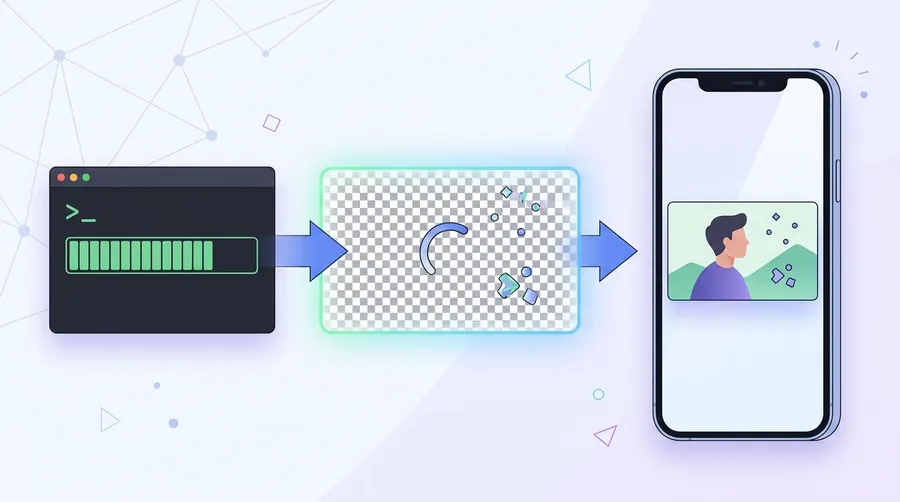
Step 6: CapCut या Premiere Pro में ओवरले को कंपोजिट करना
रेंडरिंग पूरी होने के बाद, इन ग्राफिक्स को अपनी वीडियो में जोड़ने के लिए इन स्टेप्स को फॉलो करें:
- अपनी मुख्य वीडियो क्लिप को अपने पसंदीदा एडिटर (जैसे CapCut, Premiere Pro, या VN Editor) में इम्पोर्ट करें।
- रेंडर की गई ट्रांसपेरेंट WebM या ProRes फाइल को एक "Overlay" या "PIP" (Picture-in-Picture) के रूप में इम्पोर्ट करें।
- इस ओवरले फाइल को अपनी मुख्य वीडियो के ठीक ऊपर वाली ट्रैक पर रखें।
- चूंकि इसका बैकग्राउंड ट्रांसपेरेंट है, इसलिए मोशन ग्राफिक्स आपकी वीडियो के ऊपर तैरते हुए दिखाई देंगे।
- Chroma Key का विकल्प: अगर आपका मोबाइल वीडियो एडिटर ट्रांसपेरेंट फॉर्मेट को सपोर्ट नहीं करता है, तो आप Claude Code से अपने Remotion प्रोजेक्ट का बैकग्राउंड ब्राइट ग्रीन (
#00ff00) करने के लिए कह सकते हैं। इसे एक नॉर्मल MP4 की तरह रेंडर करें, अपने एडिटर में इम्पोर्ट करें और "Chroma Key" या "Green Screen" टूल का इस्तेमाल करके हरा बैकग्राउंड हटा दें।
FAQ
क्या मैं अपने मोबाइल फोन पर Claude Code और Remotion चला सकता हूँ?
नहीं, Node.js सेटअप करने, React कोड कंपाइल करने और वीडियो फ्रेम्स रेंडर करने के लिए आपको डेस्कटॉप या लैपटॉप ऑपरेटिंग सिस्टम (Windows, macOS, या Linux) की जरूरत होगी। हालांकि, एक बार जब आप अपने कंप्यूटर पर ट्रांसपेरेंट ओवरले वीडियो रेंडर कर लेते हैं, तो आप उन्हें आसानी से अपने फोन पर ट्रांसफर करके CapCut या VN जैसे मोबाइल ऐप्स में इस्तेमाल कर सकते हैं।
क्या Claude Code का इस्तेमाल करने के लिए मुझे पैसे देने होंगे?
हाँ, Claude Code को चलाने के लिए आपके पास एक्टिव Anthropic Console अकाउंट (जिसमें API क्रेडिट्स हों) या Claude Pro/Team सब्सक्रिप्शन होना जरूरी है। क्रेडिट लिमिट और नई कीमतों की सही जानकारी के लिए आप Anthropic की ऑफिशियल वेबसाइट चेक कर सकते हैं।
मेरी रेंडर की गई WebM फाइल में ट्रांसपेरेंसी के बजाय ब्लैक बैकग्राउंड क्यों दिख रहा है?
ऐसा तब होता है जब आपका वीडियो एडिटर WebM alpha channel को सपोर्ट नहीं करता है, या फिर आपके Remotion कोड में डिफ़ॉल्ट CSS बैकग्राउंड कलर सेट हो। रेंडर करते समय --pixel-format=yuva420p और --codec=vp8 का इस्तेमाल करना न भूलें, और अपने React कंपोनेंट्स से किसी भी background color प्रॉपर्टी को हटा दें।
मैं अपने एनिमेशन्स को तेज या धीमा कैसे कर सकता हूँ?
आप अपनी कंपोजिशन की durationInFrames प्रॉपर्टी को बदलकर या Remotion के spring फंक्शन में config ऑब्जेक्ट को एडजस्ट करके एनिमेशन की स्पीड बदल सकते हैं। उदाहरण के लिए, स्प्रिंग एनिमेशन में damping की वैल्यू कम करने से बाउंस ज्यादा तेज और एनर्जेटिक हो जाता है।