Google Flow Se Character Video Kaise Banaye: Cartoon, Animal Aur Human Characters
Pawan Joshee··8 min read
AI video creators ke liye sabse badi pareshani yeh hoti hai ki har naye shot mein character ka chehra ya kapde badal jaate hain. Google Flow is mushkil ko aasan bana deta hai. Yeh Google Labs ka ek aisa browser-based AI filmmaking workspace hai jo Google ke Veo 3.1, Imagen, aur Gemini models ko ek sath lata hai. Isme aap apne character ke face ko lock kar sakte hain, lip-synced dialogue generate kar sakte hain, aur poori video ko ek timeline par edit kar sakte hain.
Agar aap character video google flow se banana chahte hain, toh yeh guide aapke liye hai. Bahut se log internet par ai character video banane ka tarika dhoondte hain, aur flow ai character animation seekhna aaj ke samay mein sabse behtar skill hai. Is step-by-step tutorial mein, hum aapko seekhayenge ki kaise ek badhiya character design karein, use Google Flow mein "Ingredient" ki tarah upload karein, aur usme action aur voice dialogue add karein.
Google Flow Kya Hai Aur Character Consistency Kaise Kaam Karti Hai
Google Flow ek advanced browser-based AI filmmaking platform hai jise Google Labs ne banaya hai. Yeh koi aam text-to-video generator nahi hai, balki ek poora production studio hai jahan aap poori kahani (scenes) ko ek sath jod sakte hain. Yeh platform teen bade AI systems par chalta hai: video aur audio ke liye Veo 3.1, images ke liye Imagen, aur continuity logic ke liye Gemini.
Character consistency (har video mein ek jaisa chehra rakhna) ke liye Google Flow ka Ingredients to Video feature sabse zaroori hai. Jab aap apne character ki photo (jo aapne Gemini ya ChatGPT se banayi ho) ko as an "Ingredient" upload karte hain aur use ek tag (jaise @DesiChacha) de dete hain, toh Veo 3.1 model har naye scene mein usi photo ko reference banakar video generate karta hai. Isse character ka face drift ya change nahi hota.
Step 1: Apne Character Ko Design Karein (First Frame Generation)
Google Flow mein video banane se pehle, aapke paas apne character ki ek saaf aur high-quality photo honi chahiye. Halanki aap Google Flow ke andar bhi photo generate kar sakte hain, lekin ChatGPT (DALL-E 3) ya Gemini Advanced ka use karke ek perfect front-facing portrait banana zyada behtar hota hai.
Character design karte waqt in baaton ka dhyan rakhein:
- Simple Background: Background jitna saaf ya solid hoga, Google Flow ke liye character ko animate karna utna hi aasan hoga.
- Clear Lighting: Chehre par acchi aur barabar lighting honi chahiye taaki AI facial features ko thik se samajh sake.
- Front-Facing Angle: Character seedha camera ki taraf dekh raha ho, isse video ki quality sabse acchi aati hai.
Photo taiyar hone ke baad use apne mobile ya laptop mein save kar lein.
Step 2: Google Flow Mein Consistent Characters Set Up Karein
Ab jab aapki reference photo taiyar hai, toh use Google Flow mein aise set up karein:
- Apne browser par labs.google/flow open karein aur ek naya project shuru karein.
- Prompt box ke upar model name par click karke use Video par set karein.
- Prompt box ke neeche diye gaye Add (ya plus icon) par click karein aur Ingredients option select karein.
- Apne character ki photo ko yahan drag aur drop karein.
- Prompt box mein
@likh kar apne character ko ek naam dein (jaise@DesiChachaya@MoniMonkey). Ab yeh photo aapke project ke liye ek permanent reference ban gayi hai.
Aap chahein toh Flow Agent (Google Flow ka Gemini-powered assistant) se bhi character sheets banane aur assets ko manage karne mein madad le sakte hain.
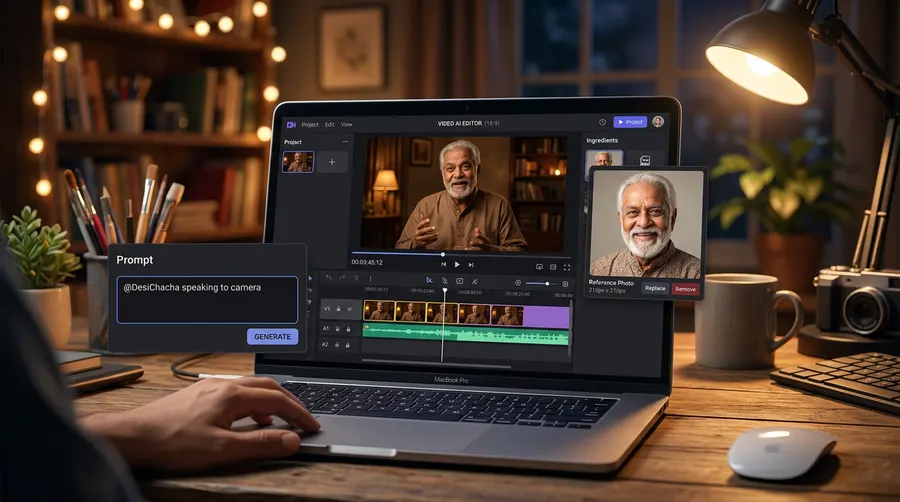
Step 3: Character Ko Actions Aur Dialogue Ke Sath Animate Karein
Google Flow ke Veo 3.1 model ki sabse acchi baat yeh hai ki yeh video ke sath-sath synchronized audio (dialogue, sound effects, aur background music) bhi ek hi baar mein generate kar deta hai. Isse aapko lip-syncing ke liye kisi teesre tool par nahi jana padta.
Apne character ko animate aur dialogue dene ke liye:
- Character Tag Use Karein: Apne prompt ki shuruat hamesha saved tag (jaise
@DesiChacha) se karein. - Action Describe Karein: Motion ko thoda dheehe aur natural rakhein taaki chehra kharab na ho. Jaise "talking to the camera while smiling" ya "blinking slowly".
- Voice Select Karein: Prompt box ke neeche Add -> Voices par click karke ek voice select karein aur prompt mein
@Voicelikhein. - Dialogue Likhein: Jo bhi dialogue aap bulwana chahte hain, use double quotes (" ") ke andar likhein.
Ek standard prompt ka example niche dekhein:
@DesiChacha standing in a vibrant Indian street market, speaking directly to the camera with a warm smile, gentle hand gestures. Cinematic lighting, photorealistic, 16:9 aspect ratio. @Voice: Andrew says "Namaste dosto! Aaj hum baat karenge AI video banane ke sabse aasan tarike ke bare mein."
Alag-Alag Character Styles Ke Liye 3 Copy-Paste Prompts
Yahan teen alag-alag styles ke prompts diye gaye hain. Inhe use karne se pehle apne character ki reference photo ko upload karke sahi tag de dein.
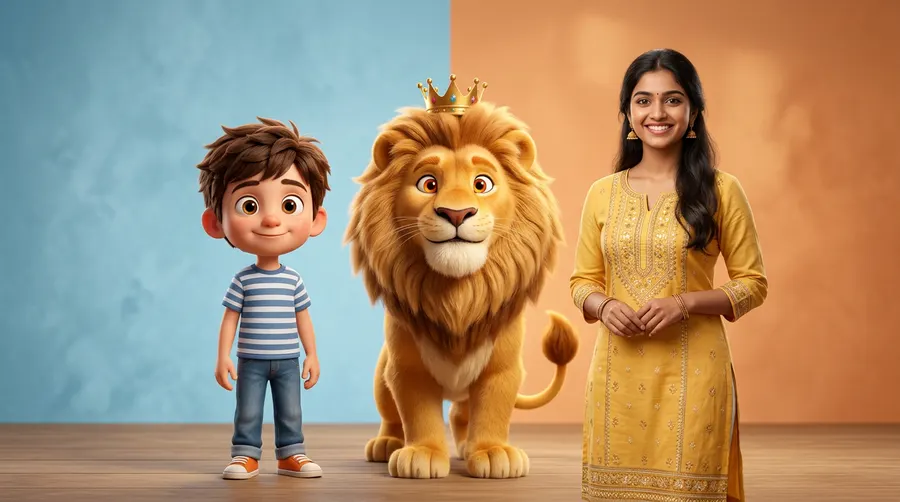
1. Cartoon Mascot (3D Animated Style)
Kids channels, educational videos ya brand promotion ke liye perfect.
@ChintuMascot, a cute 3D Pixar-style boy with large expressive eyes, wearing a blue t-shirt, sitting at a study desk. He looks at the camera, blinking and gesturing with his hands. Soft studio lighting, claymation aesthetic, 16:9. @Voice: Andrew says "Hey everyone! Welcome to today's fun learning session. Let's explore!"
2. Animal Storyteller (Fantasy Style)
Moral stories aur kahaniyon wale YouTube channels ke liye.
@SheruKing, a friendly cartoon lion with a soft golden mane, wearing a tiny red king's crown, sitting in a lush green jungle. He is talking warmly to the camera, smiling, with subtle head movements. Magical fantasy lighting, 16:9. @Voice: Andrew says "Ek samay ki baat hai, ek ghane jungle mein ek chota sa khargosh rehta tha..."
3. Realistic Desi Character (Photorealistic Human)
Vlogs, daily storytelling ya local business ads ke liye.
@RiyaDi, a realistic 25-year-old Indian woman with long dark hair, wearing a simple elegant yellow kurta, standing inside a modern cozy living room. She is speaking naturally to the camera, smiling warmly. Photorealistic, soft natural window light, cinematic depth of field, 16:9. @Voice: Andrew says "Kya aap bhi apne business ke liye AI videos banana chahte hain? Chaliye seekhte hain."
Safety Note: Hamesha dhyan rakhein ki aapke human characters poori tarah se fictional (kalpanik) hon. Google Flow kisi bhi asli ya mashhoor vyakti (celebrity/politician) ki video banane ki ijazat nahi deta.
Google Flow Ke Plans, Credits Aur Limits
Google Flow ek credit-based system par kaam karta hai jo aapke Google account se juda hota hai. Har ek video generation par aapke credits kharch hote hain, jo is baat par depend karta hai ki aapne kaun sa model aur quality chuni hai.
Neeche diye gaye table mein aap plans aur credits ki poori details dekh sakte hain:
| Plan | Monthly Subscription Cost | Monthly Credit Allowance (Extra) | Daily Credits (Sabke Liye Free) | Kiske Liye Best Hai |
|---|---|---|---|---|
| Free Tier | $0 | 0 | 50 credits/day | Beginners aur testing ke liye |
| Google AI Plus | $4.99 / month | 200 credits/month | 50 credits/day | Kabhi-kabhi 1080p videos banane ke liye |
| Google AI Pro | $19.99 / month | 1,000 credits/month | 50 credits/day | Regular solo creators ke liye |
| Google AI Ultra $100 | $99.99 / month | 10,000 credits/month | 50 credits/day | Advanced creators aur developers ke liye |
| Google AI Ultra $200 | $199.99 / month | 25,000 credits/month | 50 credits/day | Professional studios aur teams ke liye |
Dhyan rakhein: Credits har ek generation par charge hote hain, na ki request par. Agar aapke daily ya monthly credits bache reh jaate hain, toh woh agle din ya mahine roll over (carry forward) nahi hote. Sahi aur up-to-date pricing ke liye hamesha official Google Labs page check karein.
Credit Cost Per Generation (Veo 3.1)
- Veo 3.1 Lite (Lower Priority): 10 credits (Ultra subscribers ke liye 5 credits)
- Veo 3.1 Fast: 20 credits (Ultra subscribers ke liye 10 credits)
- Veo 3.1 Quality: 100 credits (Ultra subscribers ke liye koi discount nahi hai)
Behtareen Character Videos Banane Ke Pro Tips
Google Flow se best output paane ke liye in tips ko follow karein:
- Camera Movement Ko Simple Rakhein: Bahut tez camera pans ya zoom-in/out karne se character ka face bigad sakta hai. Hamesha dheehe aur smooth camera movements ka use karein.
- Start Aur End Frames Ka Use Karein: Agar aap kisi scene mein specific transition chahte hain, toh Frame to Video feature ka use karein. Isme ek shuruati photo aur ek aakhiri photo upload karein, aur Flow unke beech ka motion khud generate kar dega.
- Dialogue Chota Rakhein: Ek 8-second ki Veo 3.1 clip mein lagbhag 15-20 shabd hi thik se fit aate hain. Agar dialogue bada hai, toh Scene Builder timeline par multiple clips ko aapas mein jod lein.
- SynthID Watermark Ka Dhyan Rakhein: Google Flow se bani har video mein ek invisible SynthID watermark hota hai jo yeh batata hai ki video AI se bani hai. Is watermark ko hatane ya chhupane ki koshish na karein, kyunki yeh safety aur transparency ke liye zaroori hai.
FAQ
Main har scene mein apne character ka face bilkul ek jaisa kaise rakh sakta hoon?
Consistent face rakhne ke liye, sabse pehle apne character ki photo ko Google Flow mein "Ingredient" ke roop mein save karein. Fir apne prompt mein @ ke sath us character ka naam (jaise @MyCharacter) likhein. Isse Veo 3.1 model har baar usi reference photo ka use karega.
Kya main Google Flow ke andar direct Hindi audio generate kar sakta hoon?
Haan, Google Flow ke Veo 3.1 model mein native audio generation ka support hai. Aap apne prompt ke andar double quotes ke beech Hindi dialogue likh sakte hain aur library se kisi bhi voice reference (jaise @Voice: Andrew) ko select kar sakte hain.
Kya Google Flow ke bache hue credits agle mahine carry forward hote hain?
Nahi, Google Flow mein credits roll over nahi hote. Daily 50 credits har din ke aakhiri mein expire ho jaate hain, aur monthly subscription wale credits aapke billing cycle ke khatam hone par expire ho jaate hain. Isliye unhe samay par use kar lena hi behtar hai.
Kya main kisi celebrity ya neta ki AI video bana sakta hoon?
Nahi. Google ki safety policies ke mutabik aap kisi bhi real aur identifiable person (asli vyakti) ki bina unki ijazat ke realistic AI video nahi bana sakte. Apne projects ke liye hamesha fictional (kalpanik) cartoon, animal ya human characters ka hi use karein.