Google Flow Se Character Video Kaise Banaye: Step-by-Step Guide
Pawan Joshee··8 min read
Creating consistent character videos has always been a major challenge for AI video creators, as characters often change faces or outfits between shots. Google Flow solves this issue by combining Google's Veo 3.1, Imagen, and Gemini models into a unified AI filmmaking workspace where you can lock in character faces, generate synchronized dialogue, and stitch scenes together. By using the "Ingredients" feature and starting with a clear reference image, you can create seamless, professional-grade animations of cartoon, animal, or human characters directly from your phone or laptop.
If you want to create a high-quality character video google flow is currently one of the most powerful platforms available. Many creators in India search for an easy ai character video banane ka tarika, and mastering flow ai character animation is the best way to stand out on platforms like YouTube and Instagram. In this tutorial, we will guide you through designing your character, importing it into Google Flow as an "Ingredient," and animating it with specific actions and voice dialogue.
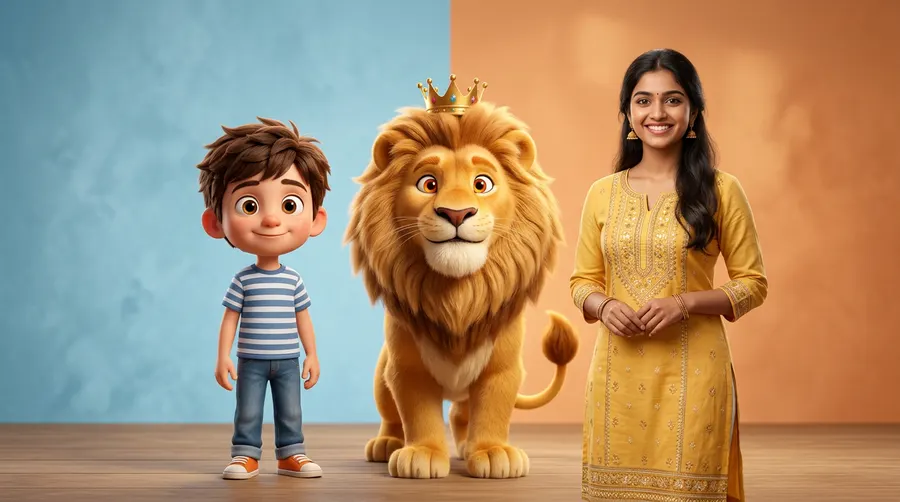
What is Google Flow and How Character Consistency Works
Google Flow is a browser-based AI filmmaking workspace developed by Google Labs. Unlike basic text-to-video generators that produce isolated clips, Google Flow is designed for scene continuity. It integrates three major systems: Veo 3.1 for video and native audio generation, Imagen for still images, and Gemini for scene understanding and continuity logic.
The secret to maintaining the same face, clothing, and style across multiple video clips is Google Flow's Ingredients to Video feature. By uploading a high-quality character portrait (created via Gemini or ChatGPT) and tagging it as an "Ingredient," you tell the video model (Veo 3.1) to use that exact visual reference for every generation. This prevents the character's face from drifting or changing between scenes.
Step 1: Design Your Character (First Frame Generation)
Before opening Google Flow, you need a high-quality, front-facing portrait of your character. While you can generate images directly inside Google Flow using Imagen, using tools like ChatGPT (DALL-E 3) or Gemini Advanced often helps you get a highly detailed character sheet first.
When designing your character, follow these guidelines:
- Use a Neutral Background: A simple or solid background makes it easier for Google Flow to separate the character from the environment.
- Ensure Clear Lighting: Bright, even studio lighting helps the AI capture facial details accurately.
- Front-Facing Angle: A direct, eye-level portrait works best as a starting frame.
Once you have generated your character, save the image to your phone or laptop.
Step 2: Setting Up Consistent Characters in Google Flow
Now that your reference image is ready, let's set up your character in Google Flow:
- Go to labs.google/flow on your browser and start a new project.
- In the prompt box, click the model name and select Video.
- Under the prompt box, click Add (or the plus icon) and select Ingredients.
- Drag and drop your character reference image here.
- In your prompt box, type
@followed by a name to save your character (e.g.,@DesiChachaor@MoniMonkey). This registers the image as a consistent visual reference.
Alternatively, you can use the Flow Agent (the Gemini-powered creative assistant) to help you generate a character sheet and organize your visual assets.
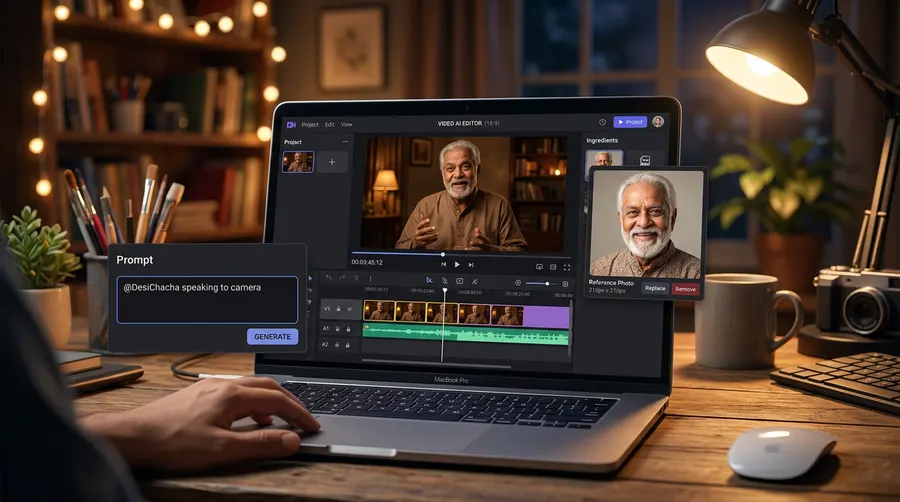
Step 3: Animating Your Character with Actions and Dialogue
Google Flow's Veo 3.1 model allows you to generate both video and synchronized audio (dialogue, sound effects, and background music) in a single generation. This is a massive timesaver compared to older workflows where you had to use separate tools for lip-syncing.
To add action and dialogue to your consistent character:
- Reference the Character: Always start your prompt with your saved character tag (e.g.,
@DesiChacha). - Describe the Action: Keep the motion subtle to avoid facial distortion. Use terms like "speaking to the camera," "smiling warmly," or "blinking slowly".
- Add Voice Reference: Click Add -> Voices under the prompt box. Choose a voice from the library (e.g., "Andrew") and type
@Voicein your prompt. - Write the Dialogue: Write the exact dialogue you want the character to speak in quotation marks.
Let's look at a typical prompt structure:
@DesiChacha standing in a vibrant Indian street market, speaking directly to the camera with a warm smile, gentle hand gestures. Cinematic lighting, photorealistic, 16:9 aspect ratio. @Voice: Andrew says "Namaste dosto! Aaj hum baat karenge AI video banane ke sabse aasan tarike ke bare mein."
3 Copy-Paste Prompts for Different Character Styles
Here are three ready-to-use prompts for different character types. Make sure to generate your reference image first, save it as an ingredient, and tag it accordingly in these prompts.
1. Cartoon Mascot (3D Animated Style)
Perfect for educational shorts, kid's content, or brand promotions.
@ChintuMascot, a cute 3D Pixar-style boy with large expressive eyes, wearing a blue t-shirt, sitting at a study desk. He looks at the camera, blinking and gesturing with his hands. Soft studio lighting, claymation aesthetic, 16:9. @Voice: Andrew says "Hey everyone! Welcome to today's fun learning session. Let's explore!"
2. Animal Storyteller (Fantasy Style)
Great for moral stories, fairy tales, and engaging kids' YouTube channels.
@SheruKing, a friendly cartoon lion with a soft golden mane, wearing a tiny red king's crown, sitting in a lush green jungle. He is talking warmly to the camera, smiling, with subtle head movements. Magical fantasy lighting, 16:9. @Voice: Andrew says "Ek samay ki baat hai, ek ghane jungle mein ek chota sa khargosh rehta tha..."
3. Realistic Desi Character (Photorealistic Human)
Ideal for daily vlogs, storytelling, or local business advertisements.
@RiyaDi, a realistic 25-year-old Indian woman with long dark hair, wearing a simple elegant yellow kurta, standing inside a modern cozy living room. She is speaking naturally to the camera, smiling warmly. Photorealistic, soft natural window light, cinematic depth of field, 16:9. @Voice: Andrew says "Kya aap bhi apne business ke liye AI videos banana chahte hain? Chaliye seekhte hain."
Safety Note: Always ensure your human characters are entirely fictional. Google Flow restricts realistic depictions of real, identifiable people to prevent misinformation.
Google Flow Plans, Credits, and Limits
Google Flow operates on a credit-based system shared across your Google account. Every generation spends a specific number of credits depending on the model and quality you select.
Here is a breakdown of the current plans and credit allocations:
| Plan | Monthly Subscription Cost | Monthly Credit Allowance (Extra) | Daily Credits (Free for All) | Best For |
|---|---|---|---|---|
| Free Tier | $0 | 0 | 50 credits/day | Beginners & testing |
| Google AI Plus | $4.99 / month | 200 credits/month | 50 credits/day | Occasional 1080p creators |
| Google AI Pro | $19.99 / month | 1,000 credits/month | 50 credits/day | Regular solo creators |
| Google AI Ultra $100 | $99.99 / month | 10,000 credits/month | 50 credits/day | Advanced creators & developers |
| Google AI Ultra $200 | $199.99 / month | 25,000 credits/month | 50 credits/day | Professional studios & teams |
Note: Credits are charged per generation, not per request. Unused daily and monthly credits do not roll over to the next cycle. Check the official Google Labs page for the current figures and regional pricing.
Credit Cost Per Generation (Veo 3.1)
- Veo 3.1 Lite (Lower Priority): 10 credits (5 credits for Ultra subscribers)
- Veo 3.1 Fast: 20 credits (10 credits for Ultra subscribers)
- Veo 3.1 Quality: 100 credits (no Ultra discount)
Pro Tips for Flawless Character Videos
To get the absolute best results from Google Flow, keep these professional tips in mind:
- Avoid Complex Camera Movements: High-speed pans or quick zooms can cause the character's face to distort or drift. Stick to slow, subtle camera moves like "slow zoom-in" or static framing.
- Use Start and End Frames: If you want to control a transition, use the Frame to Video feature. Upload a starting frame and an ending frame, and let Flow generate the animation in between.
- Keep Dialogue Short: An 8-second Veo 3.1 clip can comfortably accommodate 15–20 words. If your dialogue is longer, use Scene Builder to extend the scene or stitch multiple clips together on the timeline.
- SynthID Watermark: Remember that all videos generated by Google Flow contain an embedded SynthID watermark to mark them as AI-generated. Never attempt to remove or hide this watermark, as it ensures transparency and safety.
FAQ
How can I make my character's face look exactly the same in every scene?
To keep the face consistent, save your initial character portrait as an "Ingredient" in Google Flow. Tag it in your prompt using @ followed by your character's name (e.g., @MyCharacter). This forces the Veo 3.1 model to use the reference image instead of generating a new face from scratch.
Can I generate Hindi audio directly inside Google Flow?
Yes, Google Flow's Veo 3.1 model supports native audio generation, including Hindi dialogue. Simply write your Hindi text in quotation marks inside the prompt and select a voice reference (like @Voice: Andrew) from the library.
Do unused Google Flow credits roll over to the next month?
No, unused credits do not roll over. Your daily 50 credits expire at the end of each day, and your monthly subscription credits (e.g., 1,000 credits on the Pro plan) expire at the end of your billing cycle. It is best to use them up before they reset.
Is it legal to create AI videos of real celebrities or politicians?
No. Google has strict safety filters that restrict the realistic depiction of identifiable real people without their explicit consent. Always create completely fictional characters (cartoon, animal, or fictional humans) for your video projects.