How to Edit Reels with Claude Opus 5.5: Beginner to Pro
Pawan Joshee··8 min read
Can you actually edit a viral Instagram Reel using Anthropic's Claude Opus 5.5? The short answer is yes, but not the way you think. Claude Opus 5.5 does not have a drag-and-drop timeline like CapCut or Premiere Pro. Instead, it edits videos programmatically by writing and executing scripts through Claude Code (Anthropic's terminal-based developer agent), utilizing powerhouse tools like ffmpeg for cutting, Whisper for transcribing, and Remotion (React) for rendering high-end motion graphics and animated captions.
In this guide, we will break down the exact workflow to take a raw 9:16 smartphone clip and turn it into a highly engaging, captioned Reel exported at 1080x1920. We will also be brutally honest about where this code-driven workflow shines (automation, bulk editing, and custom template generation) and where traditional tools like CapCut remain far easier for beginners.

Why Edit Videos with Claude Opus 5.5? (The Honest Truth)
Before diving into terminal commands, let’s understand the trade-offs. Claude Opus 5.5 is a state-of-the-art agentic AI model costing $4 per million input tokens and $20 per million output tokens. It is incredibly smart at writing code, but it cannot "see" or "hear" your video timeline in real-time like a human editor. It must rely on programmatic feedback loops, logs, and metadata.
Here is how programmatic editing with Claude compares to traditional timeline editors:
| Feature | Claude Opus 5.5 + Claude Code Workflow | CapCut / Premiere Pro |
|---|---|---|
| Editing Interface | Text prompts in Terminal (No timeline GUI) | Visual timeline with drag-and-drop |
| Automation | Perfect for bulk rendering and auto-cutting silences | Manual effort required for every single video |
| Captions | High-end React-based dynamic text (via Remotion) | Standard templates, limited code customization |
| Learning Curve | High (Requires basic terminal & React familiarity) | Very Low (Beginner-friendly) |
| Execution Cost | API/Token costs (cheap for bulk, pricey for single experiments) | Free or fixed monthly subscription |
If you are editing a single, casual vlog, stick to CapCut. But if you want to automate your workflow, build an automated "Reel generator," or create highly customized kinetic typography that looks like a pro-editor made it, Claude Opus 5.5 is unmatched.
Prerequisites: Setting Up Your AI Editing Environment
To let Claude Opus 5.5 edit your footage, you need to set up Claude Code and install the necessary command-line tools on your computer.
- Install Node.js & FFmpeg: You need Node.js (for Remotion) and FFmpeg (for video rendering).
On macOS (using Homebrew):
On Windows, download the installers from official sites or use winget:brew install node ffmpegwinget install OpenJS.NodeJS winget install Gyan.FFmpeg - Install Claude Code: Run the official installation script in your terminal:
On macOS/Linux:
On Windows (PowerShell):curl -fsSL https://claude.ai/install.sh | bashirm https://claude.ai/install.ps1 | iex - Initialize Remotion: Create a basic video project folder where Claude can write React code:
npx create-video@latest my-reel-project
cd my-reel-project
Now, open your terminal inside my-reel-project and start Claude Code by typing claude.
Step 1: Raw Footage Transcription (Whisper)
The first step is getting a transcript of your raw video. Since Claude Opus 5.5 cannot listen to audio directly, we use Whisper to generate a frame-accurate JSON transcript containing timestamps for every spoken word.
Place your raw video (e.g., raw_input.mp4) in your project folder. In the Claude Code terminal, ask Claude to transcribe it using a local Python script or Whisper API:
I have a raw video named 'raw_input.mp4'. Please write a Python script using the Whisper library to transcribe this video. I need a JSON output containing word-level timestamps (start and end times for every single word) saved as 'transcript.json'.
Claude will write the script, run it, and output a structured transcript.json file. This transcript serves as the "eyes and ears" for Claude Opus 5.5. The generated file will look something like this:
[
  {"word": "Welcome", "start": 0.12, "end": 0.45},
  {"word": "to", "start": 0.46, "end": 0.60},
  {"word": "Prompt", "start": 0.61, "end": 0.95},
  {"word": "Banao", "start": 0.96, "end": 1.30}
]
Step 2: Designing the Cut Plan & Executing ffmpeg Cuts
Now that Claude has the transcript, it knows exactly when you speak, when you pause, and when you say filler words like "umm" or "uh".
Ask Claude to analyze the transcript and generate an optimized cut plan to remove dead air:
Analyze 'transcript.json'. Identify all silent gaps longer than 0.4 seconds and any filler words like "umm" or "uh". Write an FFmpeg command to cut these segments out of 'raw_input.mp4' and merge the remaining clips seamlessly into 'jumpcut_output.mp4'. To avoid audio pops, make sure to apply a 30ms audio fade-in and fade-out at each cut boundary.
Claude will generate a complex FFmpeg filter graph. Because Claude Opus 5.5 is highly efficient, it avoids common FFmpeg bugs by calculating frame-accurate cut points rather than rounded timestamps, preventing audio-video drift.
# Example command Claude might run under the hood
ffmpeg -y -hide_banner -i raw_input.mp4 -vf "select='between(t,0,4.2)+between(t,5.1,12.8)',setpts=N/FRAME_RATE/TB" -af "aselect='between(t,0,4.2)+between(t,5.1,12.8)',asetpts=N/SR/TB" jumpcut_output.mp4
Step 3: Generating Animated Captions with Remotion
Standard captions are boring. We want dynamic, viral-style kinetic typography (like the Alex Hormozi style: 1-2 words on screen, bright colors, popping animations). This is where Remotion shines.
Ask Claude to build a Remotion component that reads our transcript.json and renders animated text overlays over our jumpcut_output.mp4.
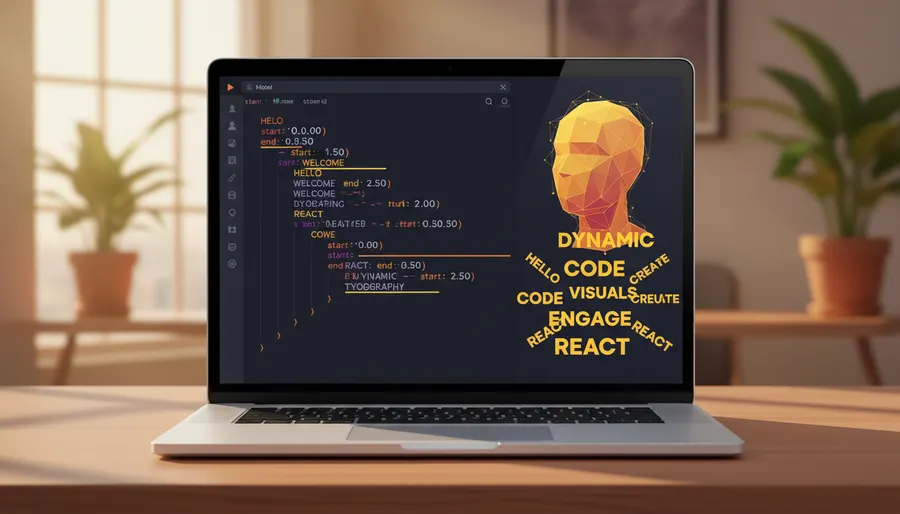
Create a React component in Remotion ('src/Captions.tsx') that reads 'transcript.json'. The component should overlay the words on top of 'jumpcut_output.mp4'.
Requirements:
1. Show only 1 or 2 words at a time, perfectly synced with the timestamps.
2. Use a bold, uppercase sans-serif font (e.g., Impact or Montserrat).
3. Add a scale animation (pop-in effect) when a new word appears.
4. Highlight the currently spoken word in yellow (#FFD700) and keep other words white.
5. Center the text in the middle-bottom of the 1080x1920 viewport.
Claude will write the React code. Below is an example of the clean React component Claude Opus 5.5 generates to handle this kinetic typography:
import { useCurrentFrame, useVideoConfig, AbsoluteFill } from 'remotion';
import transcript from '../transcript.json';

export const Captions: React.FC = () => {
  const frame = useCurrentFrame();
  const { fps } = useVideoConfig();
  const currentTime = frame / fps;

  // Find the active word based on the current playback time
  const activeWordObj = transcript.find(
    (w) => currentTime >= w.start && currentTime <= w.end
  );

  if (!activeWordObj) return null;

  return (
    <AbsoluteFill style={{ justifyContent: 'center', alignItems: 'center', bottom: 150 }}>
      <div style={{
        fontSize: 80,
        fontFamily: 'Montserrat, Arial, sans-serif',
        fontWeight: '900',
        color: '#FFD700',
        textTransform: 'uppercase',
        textShadow: '4px 4px 0px #000',
        transform: 'scale(1.1)',
        transition: 'transform 0.1s ease-out'
      }}>
        {activeWordObj.word}
      </div>
    </AbsoluteFill>
  );
};
Claude will register this composition in Remotion's root index file and run local tests to ensure the layout is perfect.
Step 4: Final Assembly and Rendering (1080x1920 Export)
With the React code written, it is time to render the final vertical video. Remotion uses a headless browser to render each frame of the React application as an image sequence, which FFmpeg then compiles into an ultra-sharp MP4 file.
In your terminal, Claude will run the Remotion render command:
npx remotion render Captions out/final_reel.mp4 --width=1080 --height=1920
Once the rendering completes, you will find final_reel.mp4 in the out/ folder, ready to be uploaded directly to Instagram or YouTube Shorts!
Pro Tips for Indian Creators (Vibe Coding Your Reels)
- Frame-Accurate Cuts: Always ask Claude to cut on frame numbers rather than time decimals. Timestamps like
2.134can lead to audio desync over long videos, whereas frame numbers keep everything locked in. - Local Processing: Since you are running Claude Code locally on your machine, you do not need to upload gigabytes of heavy video files to a cloud server. Your raw footage remains completely private on your laptop.
- Save Your Workflow as a Skill: Once Claude creates a successful pipeline, ask it: "Write a
SKILL.mdfile in my.claude/skills/directory so that I can run this entire raw-to-reel process with a single command next time." This turns your manual coding session into a reusable, one-click AI editing tool.
FAQ
Can I use Claude Opus 5.5 to edit videos on my phone?
No. Claude Code and Remotion require a desktop environment (macOS, Windows, or Linux) with Node.js and FFmpeg installed. While you can shoot raw footage on your phone, you must transfer it to a laptop or computer to run this AI editing workflow.
Is Claude video editing completely free?
No. While the software tools (FFmpeg, Node.js, and Remotion) are open-source and free, running Claude Opus 5.5 via Claude Code requires an Anthropic Console API key or a Pro/Team subscription. You pay for the API tokens used during the session ($4/M input, $20/M output).
Why did my FFmpeg command fail with an error?
FFmpeg commands generated by standard AI models often fail due to syntax errors or missing system codecs. Using Claude Opus 5.5 reduces this risk significantly, but if you hit an error, simply paste the error log back to Claude in the terminal. It will diagnose and fix the command instantly.
Is this workflow better than Premiere Pro or CapCut?
It depends. For a single video, CapCut is faster and more intuitive because of its visual timeline. However, if you are a creator or agency looking to automate video production—such as rendering 50 different variations of a Reel with different background clips or custom programmatic templates—Claude's code-driven workflow is infinitely better.