How to Make Hindi Dialogue Videos in Google Flow (Veo 3.1)
Pawan Joshee··9 min read
Creating AI videos with synchronized dialogue used to be a tedious, multi-step process. You had to generate a silent video first, create a voiceover separately using another tool, and then manually align them in editing software like CapCut or Premiere Pro. Now, with Google Flow powered by the Veo 3.1 model, you can generate stunning cinematic videos with native, synchronized audio and realistic lip-sync in a single step directly from your prompt.
Whether you are creating short-form reels for Instagram, YouTube Shorts, or narrative films, Google Flow's native audio capabilities change the game for Indian creators. In this comprehensive guide, the Prompt Banao team will show you how to write perfect Hindi and Hinglish dialogue prompts, add realistic background sound effects (SFX), and maintain character voice consistency across your clips.

1. How Native Audio Works in Google Flow (Veo 3.1)
Traditionally, AI video generators were completely silent. You had to rely on external text-to-speech tools to add voices. Veo 3.1, integrated into Google Flow, uses a dual-stream architecture. This means the AI processes and generates both the video frames and the audio track at the same time, ensuring they are automatically aligned. When a character speaks, their mouth movements, facial expressions, and timing are naturally synchronized with the generated audio.
In Google Flow, you can generate talking videos using standard text prompts, or you can use the "Ingredients to Video" workflow. The Ingredients workflow allows you to upload a Subject (your character), a Scene (the background), and a Style (the visual aesthetic) to maintain consistency while generating the video and matching audio in a single generation.
2. The Ultimate Dialogue Prompting Formula
To get consistent results, you cannot just add "with sound" or "with dialogue" at the end of your prompt. You need a structured approach that guides the AI on both the visual and auditory layers of the scene.
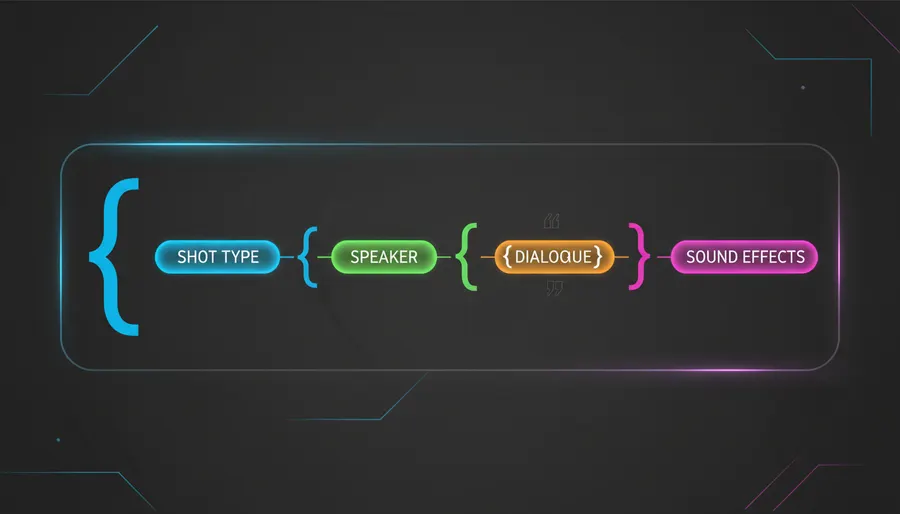
At Prompt Banao, we recommend using this highly reliable 5-part prompting formula:
[Shot & Camera] + [Subject & Action] + [Exact Dialogue in Quotes] + [Vocal Delivery & Accent] + [SFX & Ambience]
Let's break down each component:
- Shot & Camera: Define the framing (e.g., "Medium close-up of a man facing the camera"). Close-ups work best for lip-sync accuracy.
- Subject & Action: Describe who is speaking and what they are doing (e.g., "An Indian chef smiling warmly").
- Exact Dialogue: Put the exact words you want the character to say inside quotation marks.
- Vocal Delivery & Accent: Specify the tone, pace, and accent (e.g., "speaking in Hindi with a friendly Indian accent").
- SFX & Ambience: Detail the background soundscape and specific sound effects using clear prefixes.
3. Writing Hindi and Hinglish Dialogue: Tips & Limitations
Writing dialogue for an Indian audience requires understanding how Google's AI models interpret phonetic Hindi and Hinglish. Here are the rules to follow to ensure your characters sound natural:
- Keep Lines Short: For a standard 4 to 8-second clip, keep the dialogue to a single short sentence. Longer lines can cause the lip-sync to drift or the voice to rush.
- Use Phonetic Spelling (Hinglish): Since Veo 3.1's text processing is optimized for Latin script, writing Hindi dialogue in Hinglish (Latin characters) works best. Write words phonetically so the AI pronounces them correctly. For example, write "Aapka swaagat hai" instead of complex Hindi words that might get mispronounced.
- Specify the Accent and Language: Always state the accent in your prompt. For instance, write "speaking in Hindi with a natural Indian accent" or "in a deep, friendly Indian male voice".
- Single Speaker Rule: While Veo 3.1 supports multi-person dialogue, the lip-sync success rate is much higher (around 80%) when only one person is speaking to the camera in a single shot. For multi-character scenes, it is better to generate separate shots of each character speaking and edit them together later.
- Use Punctuation for Pacing: Use commas and periods inside quotes to guide the AI's pausing and pacing. A comma creates a brief pause, while a period ends the sentence naturally.
4. Adding Ambience and Sound Effects (SFX) Cues
To make your scene feel alive, you should design the entire soundscape. Google Flow allows you to define specific sound effects and background noises using simple prefixes:
- Sound Effects (SFX): Use the "SFX:" prefix to describe actions. For example:
SFX: a tea kettle whistlingorSFX: the crunch of eating a samosa. - Ambient Noise: Use the "Ambient noise:" prefix to set the background. For example:
Ambient noise: a busy Mumbai street with distant honking and chatter.
Let's look at how to structure these elements in your prompt:
| Audio Element | Prompt Syntax | Example |
|---|---|---|
| Dialogue | "Exact words in quotes" | says, "Suno, ek plate momos dena." |
| Sound Effects | SFX: [Description] | SFX: hot oil sizzling in a pan |
| Background Ambience | Ambient noise: [Description] | Ambient noise: birds chirping in a quiet Delhi park |
5. Managing Voices and Character Consistency in Google Flow
If you are making a multi-clip video, you want your character's voice and appearance to remain the same in every shot. Google Flow has built-in features to handle this:
- Voice References: In your project's prompt box, you can choose a specific voice from the "Voices" menu (under Omni Flash or Veo settings) and reference it in your prompt using
@Voice(e.g.,@Voice: Andrew). This ensures the same voice is used across different generations. - Custom Voices: You can also create a custom voice by selecting "Create New Voice", describing the voice performance (e.g., "Make the voice sound slightly raspy with an Indian accent"), and saving it.
- Ingredients Workflow: Upload a reference image of your character as the "Subject" ingredient. This ensures the visual appearance stays consistent while the AI generates new movements and matching dialogue.
6. 6 Copy-Paste Hindi/Hinglish Dialogue Prompts
Here are 6 ready-to-use prompts optimized for Google Flow and Veo 3.1. Copy and paste them directly into your project:
Prompt 1: The Roadside Tea Seller (Chai Tapri)
Medium close-up shot of an elderly Indian tea seller with a warm smile, wearing a simple Nehru jacket, standing behind a boiling tea kettle at a roadside tapri in Delhi. He looks directly at the camera. He says, "Bhaiya, ek baar humari special adrak wali chai pi lo, saari thakan door ho jayegi!" in a friendly, raspy Indian male voice. SFX: tea boiling and bubbling, metal spoon clinking against a glass cup. Ambient noise: distant street traffic and gentle murmurs of people. Cinematic documentary style, warm morning sunlight, highly realistic.
Prompt 2: Tech Reviewer Vlog
Medium close-up of a young Indian female tech creator with round glasses and a modern hairstyle, standing in a brightly lit studio with neon blue and pink background lights. She is holding a sleek smartphone and looking excitedly at the camera. She says, "Dosto, is phone ka camera sach mein ekdum next-level hai, chaliye dekhte hain!" in an enthusiastic, clear Indian female voice. SFX: camera shutter sound, subtle electronic hum. Ambient noise: quiet studio room tone. Cinematic tech vlog style, sharp focus, vibrant colors.
Prompt 3: Wise Grandfather Advice
A close-up shot of a kind, elderly Indian grandfather with white hair and deep wrinkles, sitting on a wooden chair in a sunlit courtyard. He is looking slightly off-camera with a gentle, wise expression. He says, "Zindagi mein hamesha mehnat karo, beta, fal apne aap mil jayega," in a slow, deep, and comforting elder Indian male voice. SFX: dry autumn leaves rustling, distant birds chirping. Ambient noise: quiet rural village morning soundscape. Soft cinematic lighting, shallow depth of field, realistic skin texture.
Prompt 4: Corporate Employee Humor
Medium shot of a young Indian male corporate employee in a formal blue shirt and tie, sitting at his office desk with a laptop open. He looks exhausted, holding his head with one hand, looking directly at the camera. He says, "Yaar, Monday morning ki yeh boring meeting kab khatam hogi?" in a tired, humorous, and sarcastic Indian male voice. SFX: keyboard keys typing, mouse clicking. Ambient noise: quiet hum of office air conditioning and distant phone ringing. Realistic corporate office setting, bright overhead fluorescent lighting.
Prompt 5: Cyberpunk Mumbai Detective
A low-angle medium close-up of a rugged Indian detective wearing a dark trench coat, standing under a glowing neon sign in a rainy, futuristic Mumbai street. Raindrops are dripping down his face as he looks intensely at the camera. He says, "Is shehar ke andhere mein bahut se raaz chhupe hain," in a deep, gritty, and whispering Indian male voice. SFX: heavy rain falling on metal, distant police siren. Ambient noise: low synth drone, hum of futuristic flying vehicles. Cyberpunk aesthetic, neon reflections in puddles, highly detailed.
Prompt 6: Indian Home Chef Recipe
A medium shot of an Indian woman in a colorful traditional apron, standing in a clean, modern kitchen with spices arranged in jars behind her. She is holding a wooden spatula and smiling warmly at the camera. She says, "Aaj hum bilkul dhabe jaisi paneer ki sabji banayenge!" in a cheerful, clear Indian female voice. SFX: hot oil sizzling in a pan, wooden spoon stirring. Ambient noise: soft kitchen exhaust fan hum. Bright and clean cooking show style, natural indoor lighting.
FAQ
Why is my Google Flow video completely silent?
If your generated video has no sound, first verify your model selection. Make sure you have selected a model that supports audio generation, such as Veo 3.1. Also, confirm that the "Audio" toggle is enabled in your generation settings before clicking generate.
Can I write dialogues in Devanagari script?
While Google Flow can sometimes interpret Devanagari script, it is highly recommended to write Hindi dialogues in Hinglish (Latin script). The text-to-speech engine in Veo 3.1 reads phonetic Latin spellings much more accurately, reducing mispronunciations.
How do I keep the voice consistent across multiple video clips?
To maintain the same voice, use the @Voice feature in Google Flow. Select a preset or custom voice from the "Voices" panel and add it to your text prompt (e.g., @Voice: Andrew). Always use the exact same voice tag in every shot prompt.
Does Google Flow support multi-person conversations?
Yes, Veo 3.1 supports multi-person dialogue. However, the lip-sync success rate is lower for multiple speakers in a single shot. For the best results, generate separate close-up shots of each speaker and edit them together.